> ## Documentation Index
> Fetch the complete documentation index at: https://docs-staging-chore-teams-api-autoupdate.mintlify.site/llms.txt
> Use this file to discover all available pages before exploring further.

> Describes how Auth0 Dashboard Admins can view and revoke login sessions.

# Auth0 Dashboard Login Session Management

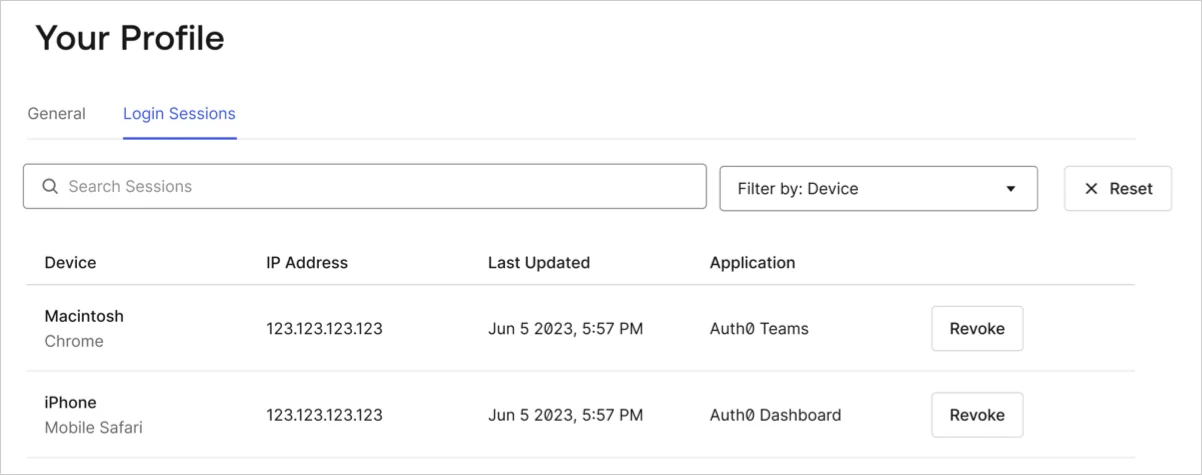
With Login Sessions, <Tooltip tip="Auth0 Dashboard: Auth0's main product to configure your services." cta="View Glossary" href="/docs/glossary?term=Auth0+Dashboard">Auth0 Dashboard</Tooltip> administrators can track active sessions from different Dashboard applications across multiple devices and browsers. You can review and revoke sessions created by users accessing the Teams Dashboard, Support Center, and Auth0 Dashboard respectively.

You can see a list of all active sessions within your Auth0 Dashboard [profile page](https://manage.auth0.com/#/profile/sessions).
<Frame>
  <img src="https://mintcdn.com/docs-staging-chore-teams-api-autoupdate/Xf4Mj52VX3D6GrCj/docs/images/cdy7uua7fh8z/3hBNRo2Bc4w6oKpF0mMt4o/3796b322593eae38eeba0a3af3698eca/English_user_profle_login_sessions.png?fit=max&auto=format&n=Xf4Mj52VX3D6GrCj&q=85&s=60d76161e64561453c0d519700eaad3e" alt="Auth0 Dashboard > Profile" data-og-width="1202" width="1202" data-og-height="475" height="475" data-path="docs/images/cdy7uua7fh8z/3hBNRo2Bc4w6oKpF0mMt4o/3796b322593eae38eeba0a3af3698eca/English_user_profle_login_sessions.png" data-optimize="true" data-opv="3" srcset="https://mintcdn.com/docs-staging-chore-teams-api-autoupdate/Xf4Mj52VX3D6GrCj/docs/images/cdy7uua7fh8z/3hBNRo2Bc4w6oKpF0mMt4o/3796b322593eae38eeba0a3af3698eca/English_user_profle_login_sessions.png?w=280&fit=max&auto=format&n=Xf4Mj52VX3D6GrCj&q=85&s=91f04b89d4b667ed4ca3ef991b91272e 280w, https://mintcdn.com/docs-staging-chore-teams-api-autoupdate/Xf4Mj52VX3D6GrCj/docs/images/cdy7uua7fh8z/3hBNRo2Bc4w6oKpF0mMt4o/3796b322593eae38eeba0a3af3698eca/English_user_profle_login_sessions.png?w=560&fit=max&auto=format&n=Xf4Mj52VX3D6GrCj&q=85&s=05c80f1a61e90df6b6352b8dffac6ae6 560w, https://mintcdn.com/docs-staging-chore-teams-api-autoupdate/Xf4Mj52VX3D6GrCj/docs/images/cdy7uua7fh8z/3hBNRo2Bc4w6oKpF0mMt4o/3796b322593eae38eeba0a3af3698eca/English_user_profle_login_sessions.png?w=840&fit=max&auto=format&n=Xf4Mj52VX3D6GrCj&q=85&s=ebe6e35729b3074dc6dde72b5b9d3a92 840w, https://mintcdn.com/docs-staging-chore-teams-api-autoupdate/Xf4Mj52VX3D6GrCj/docs/images/cdy7uua7fh8z/3hBNRo2Bc4w6oKpF0mMt4o/3796b322593eae38eeba0a3af3698eca/English_user_profle_login_sessions.png?w=1100&fit=max&auto=format&n=Xf4Mj52VX3D6GrCj&q=85&s=8cb02896b37aefb3b97f99f17176399a 1100w, https://mintcdn.com/docs-staging-chore-teams-api-autoupdate/Xf4Mj52VX3D6GrCj/docs/images/cdy7uua7fh8z/3hBNRo2Bc4w6oKpF0mMt4o/3796b322593eae38eeba0a3af3698eca/English_user_profle_login_sessions.png?w=1650&fit=max&auto=format&n=Xf4Mj52VX3D6GrCj&q=85&s=8086da3f7aa463970d7eba7e7b9e534d 1650w, https://mintcdn.com/docs-staging-chore-teams-api-autoupdate/Xf4Mj52VX3D6GrCj/docs/images/cdy7uua7fh8z/3hBNRo2Bc4w6oKpF0mMt4o/3796b322593eae38eeba0a3af3698eca/English_user_profle_login_sessions.png?w=2500&fit=max&auto=format&n=Xf4Mj52VX3D6GrCj&q=85&s=25e4940b48f491952debec2b758aaf06 2500w" />
</Frame>

To log out or revoke a session, locate the session of interest and select **Revoke**.

<Callout icon="file-lines" color="#0EA5E9" iconType="regular">
  Revoking a session does not automatically remove sessions belonging to extensions. However, sessions belonging to extensions are short-lived and do not renew when a login session is revoked or expires.
</Callout>
