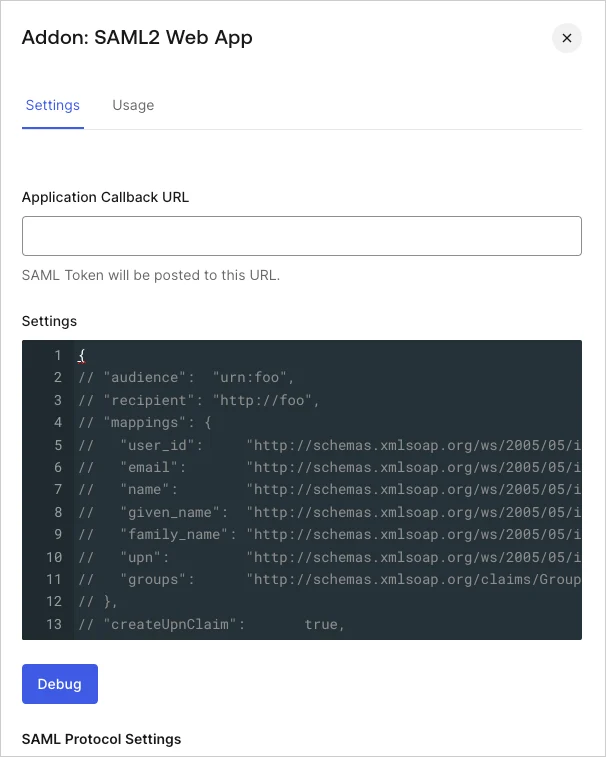
audience | string | Audience of the SAML assertion. Default is issuer on SAMLRequest. |
recipient | string | Recipient of the SAML assertion (SubjectConfirmationData). Default is AssertionConsumerUrl on SAMLRequest or callback URL if no SAMLRequest was sent. |
issuer | string | Unique identifier of the SAML identity provider, formatted as a URL. |
mappings | object | Mappings between Auth0 profile and the output attributes on the SAML assertion. Default mapping is shown above. |
createUpnClaim | boolean | Whether or not a UPN claim should be created. Default is true. |
passthroughClaimsWithNoMapping | boolean | If true (default), for each claim that is not mapped to the common profile, Auth0 passes through those in the output assertion. If false, those claims won’t be mapped. |
mapUnknownClaimsAsIs | boolean | If passthroughClaimsWithNoMapping is true and this is false (default), for each claim not mapped to the common profile Auth0 adds a prefix http://schema.auth0.com. If true it will pass through the claim as-is. |
mapIdentities | boolean | If true (default), it adds more information in the token such as the provider (Google, ADFS, AD, etc.) and the access token, if available. |
signatureAlgorithm | string | Signature algorithm to sign the SAML assertion or response. Default is rsa-sha1. |
digestAlgorithm | string | Digest algorithm to calculate digest of the SAML assertion or response. Default is sha1. |
destination | object | Destination of the SAML response. If not specified, it will be AssertionConsumerUrl of SAMLRequest or callback URL if there was no SAMLRequest. |
lifetimeInSeconds | integer | Expiration of the token. Default is 3600 seconds (1 hour). |
signResponse | boolean | Whether or not the SAML response should be signed. By default the SAML assertion will be signed, but not the SAML response. If true, SAML Response will be signed instead of SAML assertion. |
nameIdentifierFormat | string | Default is urn:oasis:names:tc:SAML:1.1:nameid-format:unspecified. |
nameIdentifierProbes | array | Auth0 will try each of the attributes of this array in order. If one of them has a value, it will use that for the Subject/NameID. The order is: http://schemas.xmlsoap.org/ws/2005/05/identity/claims/nameidentifier (mapped from user_id), http://schemas.xmlsoap.org/ws/2005/05/identity/claims/emailaddress (mapped from email), http://schemas.xmlsoap.org/ws/2005/05/identity/claims/name (mapped from name). |
authnContextClassRef | string | Default is urn:oasis:names:tc:SAML:2.0:ac:classes:unspecified. |
typedAttributes | boolean | Default is true. When set to true, we infer the xs:type of the element. Types are xs:string, xs:boolean, xs:double and xs:anyType. When set to false all xs:type are xs:anyType. |
includeAttributeNameFormat | boolean | Default is true. When set to true, we infer the NameFormat based on the attribute name. NameFormat values are urn:oasis:names:tc:SAML:2.0:attrname-format:uri, urn:oasis:names:tc:SAML:2.0:attrname-format:basic and urn:oasis:names:tc:SAML:2.0:attrname-format:unspecified. If set to false, the attribute NameFormat is not set in the assertion. |
logout | object | Controls SAML logout. It can contain two properties:callback (string) that contains the service provider (client application) Single Logout Service URL, where Auth0 will send logout requests and responses, and slo_enabled(boolean) that controls whether Auth0 should notify service providers of session termination. The default value istrue (notify service providers). |
binding | string | Optionally indicates the protocol binding used for SAML logout responses. By default Auth0 uses HTTP-POST, but you can switch to HTTP-Redirect by setting "binding" to "urn:oasis:names:tc:SAML:2.0:bindings:HTTP-Redirect". |
signingCert | string | Optionally indicates the public key certificate used to validate SAML requests. If set, SAML requests will be required to be signed. A sample value would be "-----BEGIN CERTIFICATE-----\nMIIC8jCCAdqgAwIBAgIJObB6jmhG0QIEMA0GCSqGSIb3DQEBBQUAMCAxHjAcBgNV\n[..all the other lines..]-----END CERTIFICATE-----\n". |


 Authenticate
 Manage Users
 Customize
 Auth0 AI
 Platform