

 Authenticate
 Manage Users
 Customize
 Auth0 AI
 Platform
To use Adaptive MFA, you must have an Enterprise Plan with the Adaptive MFA addon. Refer to Auth0 Pricing for details.
How it works
During a login transaction, Adaptive MFA calculates an overall confidence score based on analysis of three risk assessments:
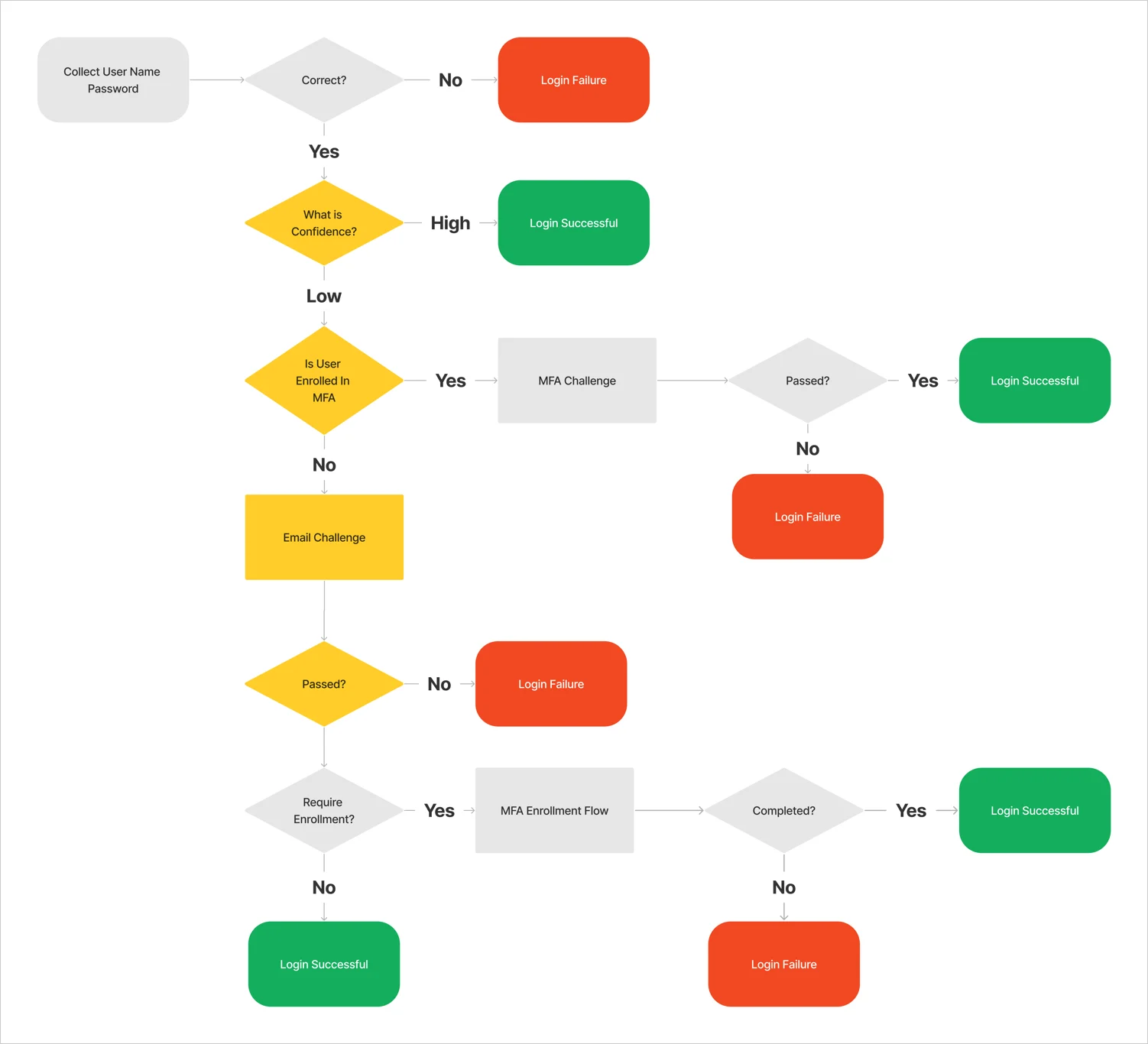
When Adaptive MFA determines the overall confidence score is low (that the login transaction is high-risk), it requires the user to verify their identity with MFA. If the user is not enrolled in MFA, they are required to complete additional verification before they are eligible to do so.
Adaptive MFA includes a comprehensive security flow that ensures the authenticity of users:
Customize Adaptive MFA
You can use Actions to customize the MFA flow and provide the best experience for your users. To learn more about risk assessments, confidence scores, and customization options, read Customize Adaptive MFA.Support and limitations
Authorization flows
Adaptive MFA is supported by all authentication and that start with the end user. To learn more about the different flows and protocols, read Authentication and Authorization Flows and Protocols.
*Adaptive MFA is not supported for -initiated flows, but you can simulate the flow with OIDC applications. To learn more, read Configure IdP-Initiated SAML Sign-on to OIDC Apps.